
// CYBER NOMAD & REMOTE WORK INFRASTRUCTURE
Ruggedized Laptop for Nomadic Work: Buy for the Real Conditions
A ruggedized laptop for nomadic work should solve the failures your route actually creates: dust in ports, vibration on rough roads, glare outside and scarce charging opportunities. It should not simply look expedition-ready. For remote workers moving between vehicles, campsites and temporary shelter, the right purchase balances protection with weight, repairability and daily power consumption.
Start with where you work, not where you drive. A laptop used inside a dry, sheltered workspace faces different risks from one opened beside a dusty trail every afternoon. That distinction can save money—and redirect the budget toward connectivity, backup power and shelter, which often determine whether a workday happens at all.
Match a ruggedized laptop for nomadic work to Your Exposure
There are three practical buying tiers: a conventional business laptop in a protective case, a semi-rugged machine with reinforced construction, and a fully rugged system designed around environmental protection. A case protects during transport but usually does little for an exposed keyboard or connected charging port. Semi-rugged models suit occasional outdoor work; fully rugged machines make more sense for repeated field exposure.
Read the actual test conditions. An IP rating describes specified dust and water protection, not universal weatherproofing. Military-standard testing claims need supporting details about drops, vibration and temperature. Ask whether testing covers the configuration you are buying, and whether port covers must remain closed. Those details matter when power and internet cables stay connected all day.

Spend on the Workload, Not the Armor Alone
Typical industry pricing runs roughly –for capable business laptops, –for semi-rugged systems and –or more for fully rugged configurations. These are broad market ranges, not WOWLS prices. Refurbished rugged hardware can cost substantially less, but battery replacement, obsolete ports and limited warranty coverage can erase the apparent saving.
For browser-heavy work, documents and video calls, prioritize 16 GB of memory or more, solid-state storage and a current supported operating system. Editing large media files or running local development environments may justify 32 GB and stronger processors. Dedicated graphics can sharply increase power demand. Check whether storage, batteries and keyboards are replaceable, and whether service is available along your intended route.
Treat Electricity as Part of the Purchase
Battery-life claims rarely describe bright-screen video meetings over a weak connection. Estimate energy from your own workload: a laptop averaging 30 watts over eight hours consumes approximately 240 watt-hours before charging losses. Add your router, lighting and other devices separately. Size storage for working hours and poor-weather days rather than assuming solar production will always cover demand.
USB-C charging can simplify a mobile setup, but confirm the required wattage and compatible charging profiles. Some rugged machines need proprietary adapters or higher-power supplies. A suitable regulated DC charger can avoid unnecessary inverter conversions. Swappable batteries are useful; hot-swapping is a separate capability that must be explicitly supported. Never assume a removable battery can be changed without shutting down.
Make the Shelter Do Some of the Protecting
A sheltered workstation reduces the need to buy maximum ruggedness. Shade improves screen visibility; a stable desk protects connectors; ventilation helps control heat. Condensation remains a concern when moving cold equipment into warmer, humid shelter. Follow the manufacturer's operating guidance and allow equipment to acclimate before powering it on when moisture is present.
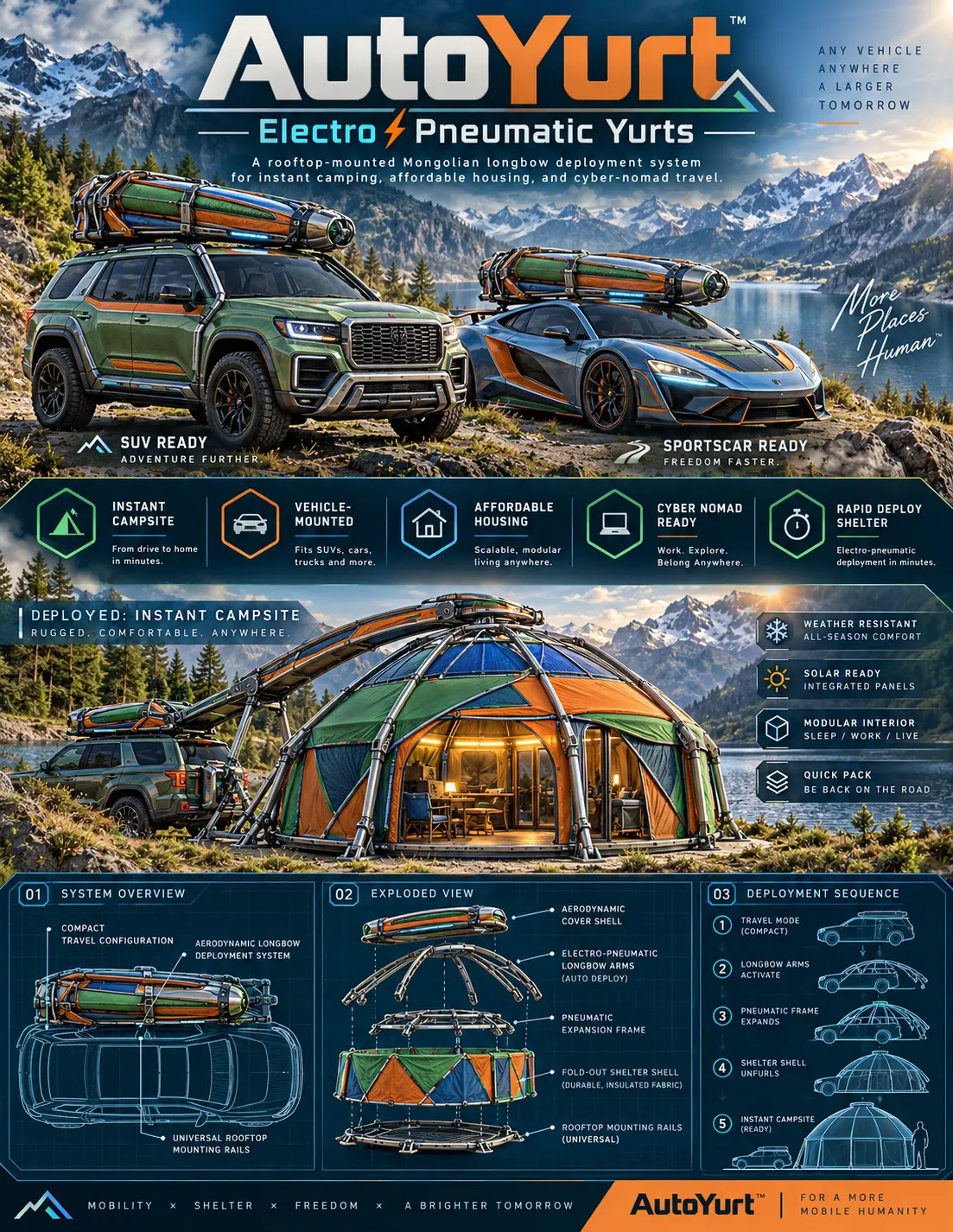
The WOWLS AutoYurt concept approaches nomadic work from this infrastructure angle: a proposed rooftop shelter with electro-pneumatic deployment, an insulated fabric shell and a flexible sleeping, working or living layout. Integrated exterior solar panels are envisioned for off-grid device power, but no laptop-runtime promise follows from that. Explore /yurt and join the waitlist through /contact; AutoYurt is a concept, not an available shelter.
Buy a Recoverable Workday
The strongest chassis cannot rescue a lost file or unavailable network. Use encrypted storage, automatic backups and an offline copy of critical documents. Test mobile connectivity where you actually stop, and consider an external antenna or separate hotspot if reception is consistently weak. A built-in cellular modem is convenient, but verify regional network compatibility before paying extra.
Before purchasing, try the keyboard, trackpad and display under realistic conditions. Compare carrying weight with the charger included. For sheltered nomadic work, a repairable business laptop plus dependable power may outperform a heavier rugged machine as a complete setup. Pay for full ruggedization when exposure is routine—not simply because the destination is remote.
Do I need a fully rugged laptop to work from a vehicle or rooftop shelter?
Not necessarily. If you work inside a dry shelter and transport the laptop in a protective case, a well-built business laptop may be the better value. Fully rugged models become more compelling with frequent dust, rain, drops or exposed field use. Compare environmental test details, charging requirements and repair options before buying. For an AutoYurt-style workspace, plan the laptop, power supply, ventilation and connectivity together. WOWLS AutoYurt remains a concept you can register interest in, rather than a shelter currently available to purchase.