
// CYBER NOMAD & REMOTE WORK INFRASTRUCTURE
Off-Grid Power Management App: Smarter Mobile Living
An off-grid power management app should answer one practical question: can you finish tomorrow’s work without finding a socket tonight? For remote workers moving between campsites, trailheads and temporary bases, the useful dashboard is not the prettiest one. It is the one that turns battery capacity, solar harvest and appliance demand into decisions you can trust.
Start with the electrical system, not the download. An app cannot create energy, fix undersized wiring or make incompatible equipment communicate. The strongest setup pairs reliable measurement with local controls, clear alerts and a realistic energy budget—then adds automation where it genuinely reduces friction.

What an off-grid power management app actually controls
Three functions often get bundled together: monitoring, forecasting and control. Monitoring reports battery state of charge, incoming solar power and outgoing loads. Forecasting estimates how long your reserve will last. Control changes settings or switches compatible circuits. A product that does the first does not necessarily do the other two.
Look for battery-side measurement through a compatible shunt or battery management system, rather than relying only on voltage. Ask whether the dashboard includes every charging source and load; an unmeasured circuit can undermine the whole forecast. Historical graphs matter, too: they reveal whether a refrigerator, inverter standby draw or evening workstation is quietly consuming your overnight reserve.

Build Around the Workday, Not the Battery Percentage
Calculate energy in watt-hours: watts multiplied by operating hours. A laptop averaging 60 watts for eight hours uses 480 watt-hours; a router averaging 15 watts over the same period adds 120. That illustrative 600-watt-hour workday excludes lighting, refrigeration, conversion losses and everything else sharing the battery. Measure your actual equipment before sizing storage.
A useful app makes that budget visible and lets you prioritize circuits. Keep communications and essential refrigeration ahead of discretionary loads. Schedule flexible charging during strong solar production, and set reserve alerts early enough to change plans. Electric cooking, space heating and cooling deserve separate scrutiny: their demand can overwhelm a system designed primarily for laptops and lights.
Compatibility Beats a Long Feature List
Your shortlist should begin with supported hardware: battery chemistry, battery management system, solar controller, inverter and any controllable distribution equipment. Confirm exact model support and required gateways before purchasing. Bluetooth can serve a small shelter well; remote access generally needs an internet connection and may introduce a subscription or cloud dependency.
For a cyber nomad, offline operation is a purchasing criterion, not a bonus. Check whether readings, settings and alerts remain available without cellular service. Prefer systems with physical overrides and documented behavior after a reboot or lost connection. Remote switching is useful, but electrical protection must remain in correctly specified fuses, wiring and hardware—not depend on an app staying online.
Budget for the System Behind the Screen
Manufacturer companion apps are often included with compatible equipment. As broad industry planning ranges, battery monitors commonly cost roughly –, while communications gateways and control hardware can add several hundred dollars. These are not WOWLS prices or installed-system quotes; batteries, solar panels, inverters, wiring and professional installation are separate expenses.
Compare total ownership cost rather than subscription price alone. Ask about paid remote access, historical-data retention, account sharing and export options. A low-cost dashboard becomes expensive if it requires replacing functioning equipment. For a modest mobile office, dependable battery monitoring and a well-set alert may deliver more value than elaborate automated load switching.
Where AutoYurt Fits Into the Mobile Office
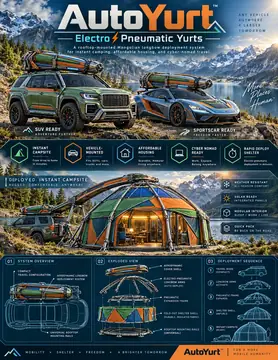
WOWLS AutoYurt is a proposed electro-pneumatic rooftop shelter concept built around a flexible sleeping, working and living space. Its design calls for low-profile longbow housing, an insulated fold-out shell and integrated exterior solar panels for off-grid device power. It is a shelter concept to register interest in, not an available, validated energy-management platform.
That distinction helps frame a productive consultation: describe your daily watt-hour demand, connectivity needs, vehicle platform and expected weather before discussing equipment. No AutoYurt app, battery capacity or controller compatibility is established here. Explore /yurt first, then use /contact to join the waitlist and discuss your mobile-work requirements. The broader WOWLS mobility concepts provide context for combining transport and shelter without confusing design ambitions with demonstrated capabilities.
Can an off-grid power management app keep my mobile office running all day?
It can help you manage the available energy, but runtime depends on usable battery capacity, actual loads, charging conditions and system losses. Choose an app that reads compatible monitoring hardware, works locally without internet and warns you before your reserve becomes critical. Budget in watt-hours rather than battery percentage alone. For an AutoYurt-based workspace, treat power hardware and app integration as requirements to discuss during concept consultation, not as confirmed features of an available product.