
// CYBER NOMAD & REMOTE WORK INFRASTRUCTURE
Rugged Pelican Case Workstation for Off-Grid Work
Searching for a rugged pelican case workstation usually means you want more than a laptop in a waterproof box. You want a portable command center: protected equipment, organized power, dependable connectivity and a working surface that survives the journey. For cyber nomads, the strongest setup separates three jobs—transport protection, usable workspace and overnight shelter—instead of expecting one heavy case to do everything.
Start with your actual workload. Writing and video calls need less power and cooling than editing footage or running complex models. Then decide whether the case will ride inside a vehicle, travel as checked baggage or move frequently between camps. Those choices determine its size, internal layout and whether an integrated screen earns its weight.
Build the Workstation Around the Work
A rugged protective-case workstation works best when its layout follows your daily routine. A removable laptop tray is lighter and easier to service than a permanently installed computer. A lid-mounted monitor creates a cleaner deployment, but adds leverage at the hinges and can make the open case unstable. Put batteries and other heavy components low, and check stability with every screen deployed.
Pick-and-pluck foam is convenient for an early layout; custom-cut closed-cell foam or a removable mounting panel suits a more settled build. Leave room for cable bends, connector access and replacement equipment. Avoid drilling through a weather-sealed shell unless you understand how the modification affects its protection. Exterior dimensions matter, but usable internal depth decides what actually fits.

Power Is a Budget, Not a Battery Label
Calculate energy in watt-hours: average consumption multiplied by working hours. A setup averaging 60 watts over six hours needs 360 watt-hours before conversion losses and reserve capacity. Measure your real equipment rather than sizing from the maximum rating on its charger. A bright external display, cellular router and satellite terminal can materially change the total.
Direct USB-C power can avoid unnecessary inverter losses when voltage and power-delivery requirements match. Keep fuses, disconnects and ventilation accessible; a sealed transport case is not automatically a safe enclosure for operating batteries or electronics. Treat solar as variable replenishment, not guaranteed daily output. Before flying, verify battery limits and carriage rules with the airline.
Budget for the Whole Working System
As broad industry budgeting ranges, a quality empty protective case may cost roughly –, while trays, foam, mounts and cabling can add –. Portable power commonly adds several hundred dollars or more. These are planning allowances, not WOWLS prices; electronics, connectivity hardware and custom fabrication can push a complete build substantially higher.
Compare the assembled weight and deployment time, not just the parts bill. A separate folding table and conventional laptop bag may outperform an elaborate integrated build if you rarely work outside. Conversely, frequently moving sensitive equipment across rough terrain can justify better protection. Ask custom builders about repair access, replacement inserts and whether any protection rating applies after modifications.
Connectivity and Comfort Decide Whether You Stay Productive
Connectivity needs a fallback. Cellular service depends on coverage and congestion; satellite connectivity needs suitable sky visibility and additional power. Place antennas deliberately rather than burying them inside the case. Test your intended call and upload workflow before leaving reliable service, and keep essential documents available offline.
Weatherproof storage does not equal weatherproof operation. Open lids expose connectors, glare makes screens tiring, and direct sun increases thermal load. Shade, seating height and a stable keyboard surface matter more after four hours than a dramatic equipment layout. Keep drinks away from power distribution and route cables where footsteps, doors and moving shelter components cannot pinch them.
Pair Portable Electronics With a Deployable Base
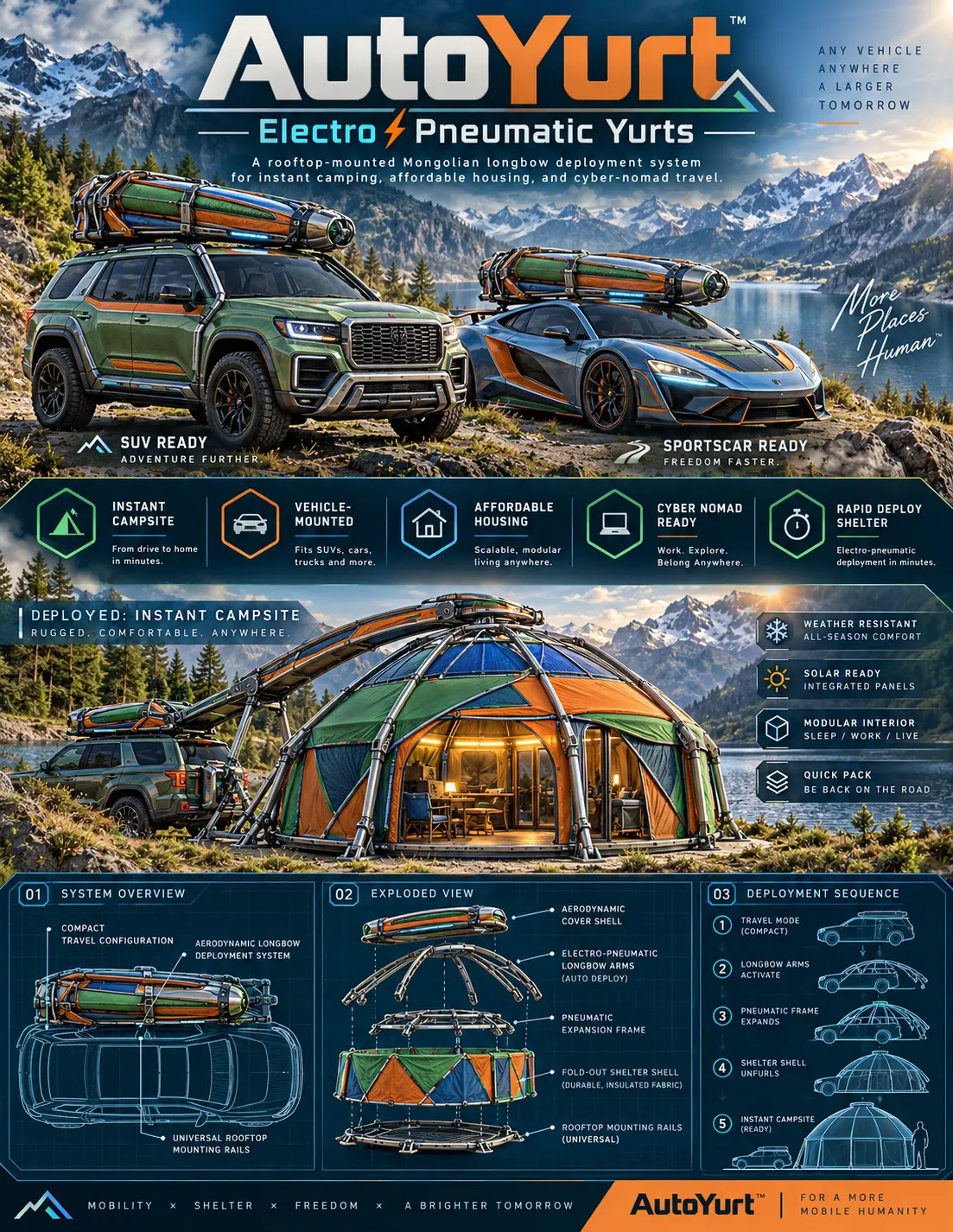
WOWLS AutoYurt approaches the other half of remote work: the space around the equipment. The concept combines low-profile aerodynamic longbow housing with electro-pneumatic arms, a pneumatic expansion frame and an insulated fold-out shell. Its proposed flexible interior supports sleeping, working or living, while integrated exterior solar panels are intended for off-grid device power.
AutoYurt remains a concept, not a delivered shelter with verified deployment or weather performance. Register interest through WOWLS to discuss the intended rooftop-rail approach, vehicle fit and workspace priorities. Keep your workstation independently removable: you should be able to service electronics, relocate to another workspace or pack the vehicle without dismantling your entire home base.
Is an integrated rugged-case workstation better than a laptop and portable power station?
Choose an integrated workstation when equipment protection, repeatable setup and organized cabling outweigh added weight and complexity. A laptop with separate portable power is usually easier to upgrade, carry and use in cafés or shared offices. For off-grid living, either approach still needs shade, ventilation, connectivity and a comfortable working surface. Buy around your measured workload first, then consider shelter separately. WOWLS AutoYurt is a concept you can register interest in, rather than an available workstation or finished housing product.